Showcase Your Products Professionally in Odoo with the Product Presentation Report
showcase-your-products-professionally-in-odoo-with-the-product-presentation-report-15
Introduction
In the world of sales and marketing, first impressions matter. Whether you’re pitching to clients, sending a catalog to prospects, or embedding product sheets in proposals, a polished product presentation can elevate your brand. But designing catalogs outside Odoo and merging data manually is tedious.
That’s why we built the Product Presentation Report module (by Rootlevel) — to let you generate professional, branded product presentation PDFs directly from Odoo.
Why Use a Product Presentation Report Module
- Saves time vs manual catalog design
- Keeps your product data (names, images, descriptions, pricing) in sync
- Enables consistent branding and layout
- Allows combining multiple products with its variants into a single, shareable document
- Useful for sales catalogs, marketing proposals, client portfolios
Key Features & Capabilities
- Single & multiple product reports – Generate presentations for one product or multiple products at once.
- Product variants, images & descriptions – Includes product details, variant info, and images automatically.
- Branded, clean layouts – Get a professional and consistent design for all product reports.
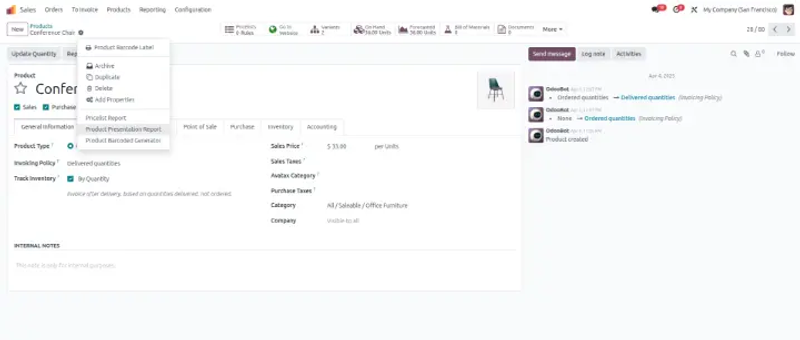
- Easy wizard-driven generation – Create reports quickly via the “Action → Product Presentation Report” option.
- PDF output – Download or share ready-to-use PDF documents instantly.
- Version support – Compatible with Odoo 14.0, 15.0, 16.0, 17.0, and 18.0.
- Dependencies – Works with core Odoo stock and mail modules.
How It Works
- Go to Inventory → Products (or to a specific product in the product form).
- Click on the Action menu, and select “Product Presentation Report”.
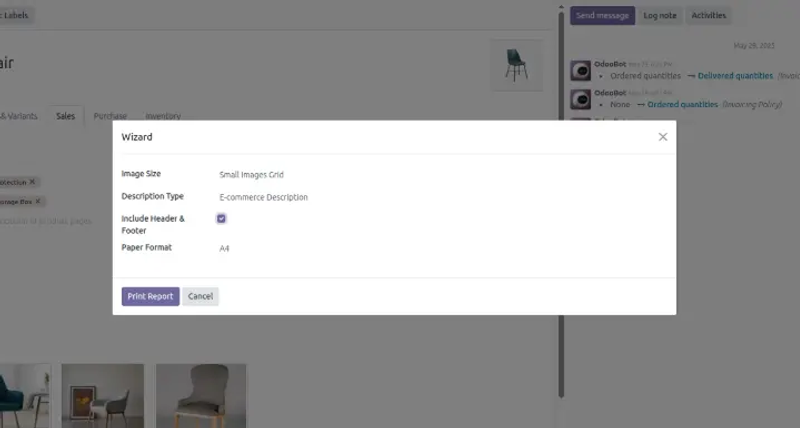
- In the wizard that appears, specify: paper format and select include/exclude header/footer option
- Click Print Report (or “Generate”) — the module will compile content and render a PDF document.
- Download or view the PDF, which includes product images, names, descriptions, and layout as you configured.
Use Cases & Benefits
- Sales & Marketing Teams: Create catalogs or product booklets to send to prospects or clients.
- Distributors / Resellers: Share a professional product sheet with partners.
- B2B Quotations: Embed product presentation into customer proposals.
- Trade Shows / Brochures: Use the PDF for offline brochures or digital displays.
- E-commerce / Catalog Publishing: Generate printed catalogs from live product data.
Benefits:
- Reduces duplicate work (don’t export to another tool just for design)
- Ensures your published catalog always reflects current product data
- Improves brand perception with consistent, clean layouts
- Quick generation — no external layout designer needed
Screenshots
Click on "Action" button in the product view and select "Product Presentation Report".
Fill in the report details through the wizard form.
Click Print Report to instantly generate the PDF.
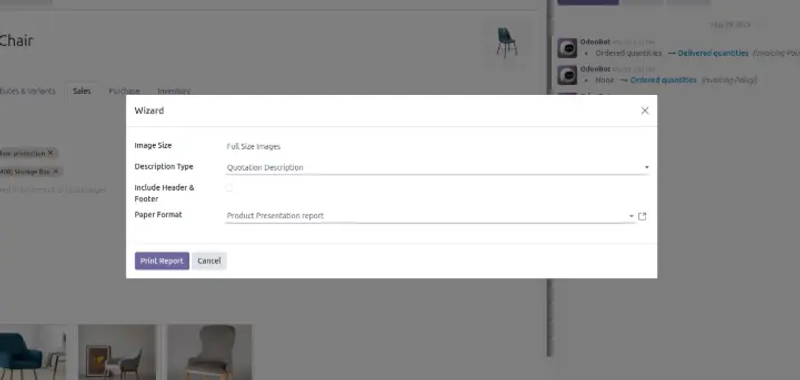
Click Print Report to instantly generate the PDF.
Best Practices & Tips
- Choose high-quality images (at least 300 dpi) so the PDF looks good in print
- Use consistent naming, descriptions, and avoid overly long text blocks
- Order your products meaningfully (e.g. by category, alphanumeric)
- Test with a few products before generating a large catalog
- If you update product data (images or descriptions), regenerate the report to keep consistency
- Use this in sales workflows — e.g. send the PDF in an email automatically